Free · copyright-safe · works on business accounts

Free sound effectsfor TikTok

The whooshes, hits and meme sounds your For You page runs on. Cleared for every account type, so nothing gets muted. Download, drop in, post.

50 MP3s · CapCut, the TikTok app & Premiere · singles need no sign-up
Tap to hear50 sounds · swipe to browse
swipe
Drops straight into CapCut TikTok app Premiere Pro After Effects DaVinci Resolve InShot
Why it matters

On TikTok, the sound is the hook

TikTok was built around audio before it was built around video. The algorithm is watching for the first swipe-away. Sound is how you stop it.

Stop the scroll in one second

TikTok decides in the first second, not the first three. A hit under your opening frame buys you the next four.

Business account? Trending sounds are locked

Business profiles only get the Commercial Music Library. These are yours on any account type, monetised or not.

Make your video the sound

Post with your own audio and TikTok labels it an original sound. Other creators can pick it up. That's reach you can't buy.

Cut on the whoosh

Every jump cut, zoom and text pop wants something under it. Silence between edits is what reads as amateur.

Every sound

Pick a moment, find the sound

Sorted by what’s happening in your edit. Hit play to hear it, tap the name for its download page.

↑↓ move  ·  space play  ·  D download

The free pack

50 sounds. One zip. Zero strings.

Whooshes, impacts, pops, memes and risers — the sounds you actually reach for mid-edit, named so you can find them. Every one cleared for personal, business and monetised use.

  • ✓Free for everything that earns — monetised video, paid ads, brand work, client deliverables. No credit, no fee, no expiry.
  • ✓Works on a business account. The Commercial Music Library locks you out of trending audio; it has no say over a file you import.
  • ✓Level-matched across the pack — one-shots peak at −1 dBFS, longer cues sit at −16 LUFS, so you are not re-balancing every file.
  • ✓Sorted into 7 folders by the job they do, and named for the moment they mark.
  • ✓Grab singles below with no email. The full zip costs an address.

The download starts the moment you hit send — your address is not needed for that. We keep it so we can tell you when new sounds are added. Never shared, never sold.

tiktoksfx — 50 free sounds50 files
Swipes & Transitions10
Viral & Meme9
Meme Music10
Hits, Booms & Bass4
Notification & UI7
Comedy & Cartoon6
Suspense & Silence4
swipe-whoosh.mp3
MP3 · 48kHz · every file named for the moment it marks
Adding it

One move. Any editor.

Import the MP3, drop it under the clip, nudge it to the frame. The buttons have different names; the move doesn’t change.

Sound effects in CapCut

Made by the same company as TikTok. Most TikToks are cut here.

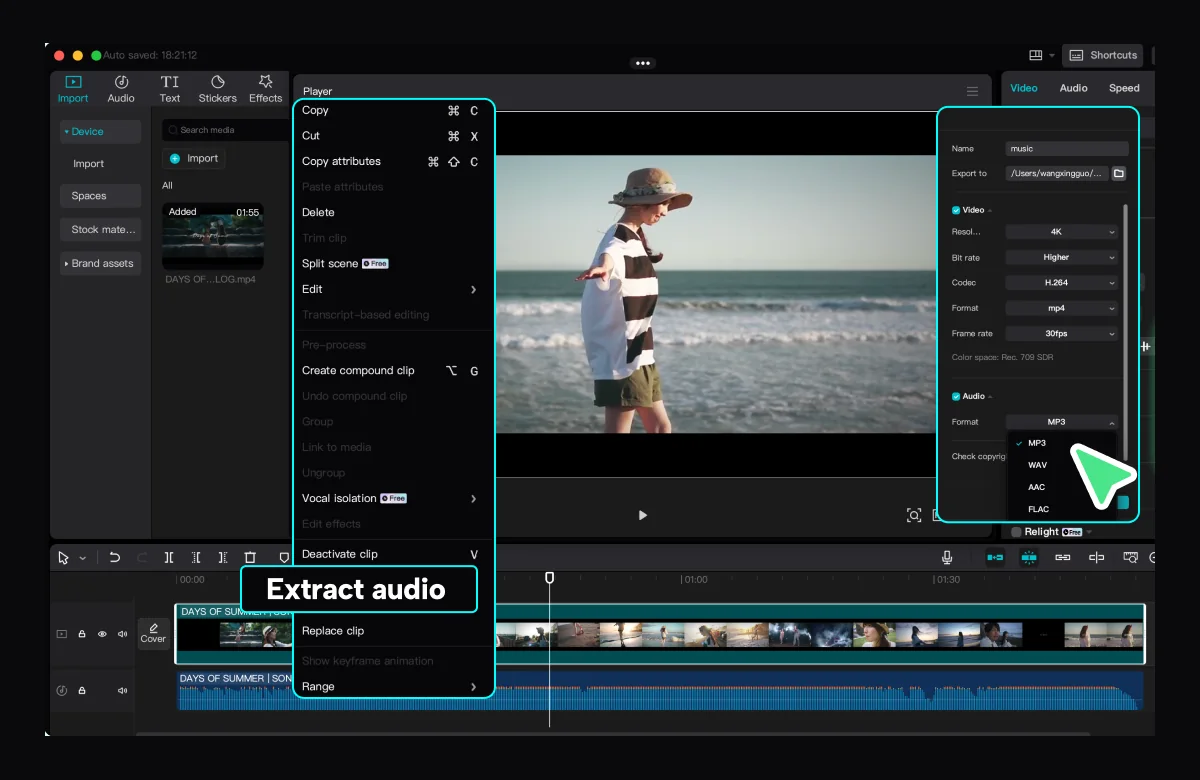
  1. Audio → Sounds → Import from your device
  2. Pick the MP3
  3. Drag it to the cut, trim the tail
Full CapCut walkthrough →

Sound effects in the TikTok app

No other app needed, and it works on business accounts.

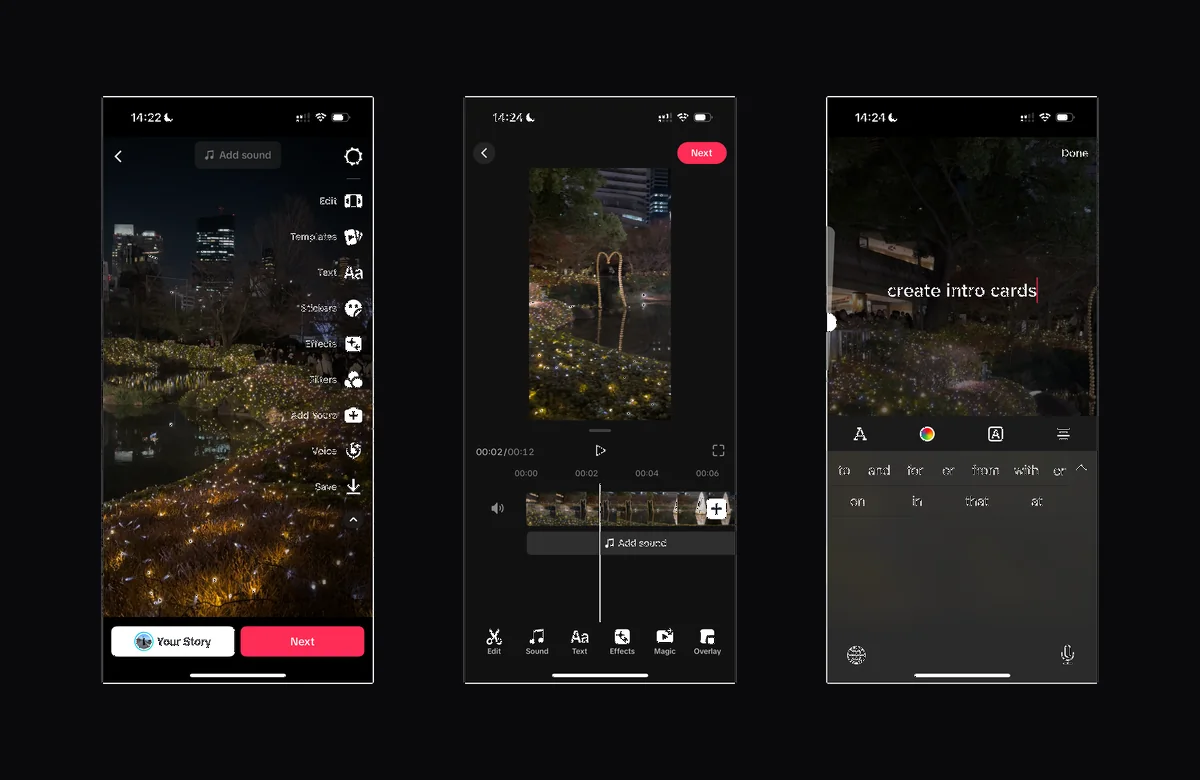
  1. Upload the clip, tap Add sound
  2. Sounds → Import, choose the MP3
  3. Set the start point and post
Full TikTok app walkthrough →

Sound effects in Premiere Pro

For the bigger edit, when you want the levels exactly right.

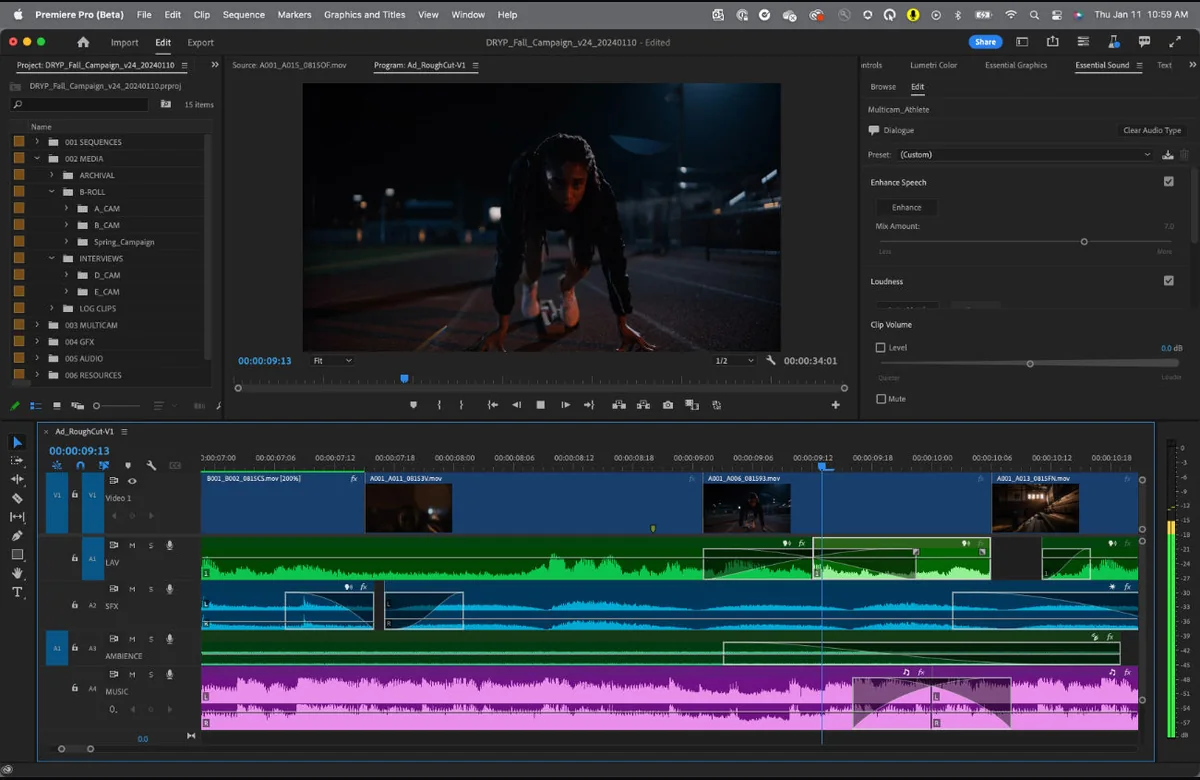
  1. Import the MP3 into your project
  2. Drop it on A2 under the cut
  3. Ride the level so it sits under your voice
All three editors, step by step →
CapCut on desktop with the clip menu open on Extract audio, the imported MP3 sitting on the audio track below the video.
CapCut — the imported MP3 lands under the clip.
Three TikTok app screens: the editor with Add sound in the top bar, the sound trimmer showing the clip timeline, and the text overlay screen.
TikTok app — Add sound, then Import your MP3.
Premiere Pro with a vertical TikTok edit in the program monitor and stacked audio tracks for dialogue, ambience and sound effects.
Premiere Pro — sound effects get their own audio track.
Questions

Things people ask before they download

Are these sound effects actually free to use on TikTok?+
Yes, all 50. Play any of them above and download it, no account, no email. The only thing that asks for an email is the single zip with everything in it. Nothing is watermarked, time-limited or held back for a paid tier.
Can I use them on a TikTok business account?+
Yes, and that's the point. Business accounts are limited to TikTok's Commercial Music Library, which is why most trending sounds show as unavailable. These files aren't TikTok sounds at all — they're MP3s you add in the editor — so they work on personal, creator and business profiles alike.
Will TikTok mute my video or flag it for copyright?+
Two different systems, and the pack clears both. The Commercial Music Library restriction governs what you can pick inside the TikTok app — it has no reach over audio already sitting in the video you upload, so importing sidesteps it entirely on any account type. Muting is separate: it happens when your audio fingerprint matches a commercial master in a rights database. The sounds we recorded for this library have no such master to match against. If you are putting a specific file into something high-value, the licence page sets out exactly what you are getting.
Do I have to credit tiktoksfx?+
No. Use them, don't mention us, that's fine. If you want to tag us we'd appreciate it, but it's never a condition.
How are these different from the sounds inside TikTok?+
TikTok's built-in sounds are licensed music and other people's audio. You can't cut them frame-accurately, they can be pulled without warning, and on a business account most of them are locked. These are short effects you own a copy of, placed exactly where you want them, and they never expire.
How do I add one in the TikTok app itself?+
Upload your clip, tap Add sound, then Sounds → Import and pick the MP3 from your camera roll or files. Set where it starts and post. The full walkthrough, with CapCut and Premiere as well, is in the guide.
Are the meme sounds the real recordings?+
A sad violin, a dramatic sting, a record scratch — these are recognisable ideas rather than one specific recording, and ours are cut for this library rather than taken from the famous version. They do the same job in an edit without being the same file, which is the entire reason they are safe to hand to a client. Details on the licence page.
What format are the files?+
MP3, 48kHz. Every editor opens them — CapCut, the TikTok app, Premiere, Resolve, InShot, After Effects. Nothing to convert, nothing to install.
Do these work on Reels and Shorts too?+
Yes. They're picked for how TikTok edits, but they're ordinary audio files. The same MP3 goes into a Short, a Reel or a long-form upload unchanged.
Why does the zip need an email?+
Because the zip is the one thing we ask something for. Every individual sound is free without it, no email, no account. The download itself is instant and does not depend on the address — we keep it only so we can tell you when new sounds land.
Preview
0:00